Commit Validation Error: GlobalProtect
Symptom
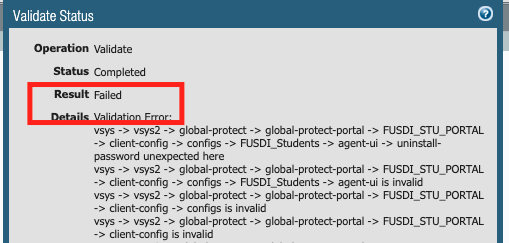
Downgrading the Firewall from one main release of PAN-OS to another main release, a commit/validation error occurs for GlobalProtect:
This can be seen when either trying to Commit or validate the configuration using Commit > Validate Commit :
Environment
- PAN-OS 9.1.x and below.
- Palo Alto Firewall.
- GlobalProtect configured with non-default portal agent settings.
Cause
- The schema between main releases may differ. The problem can be tracked by navigating through the path referenced in the validation error log. In the above message, the error is due to setting under GUI: Network > Portals >Agent >App :
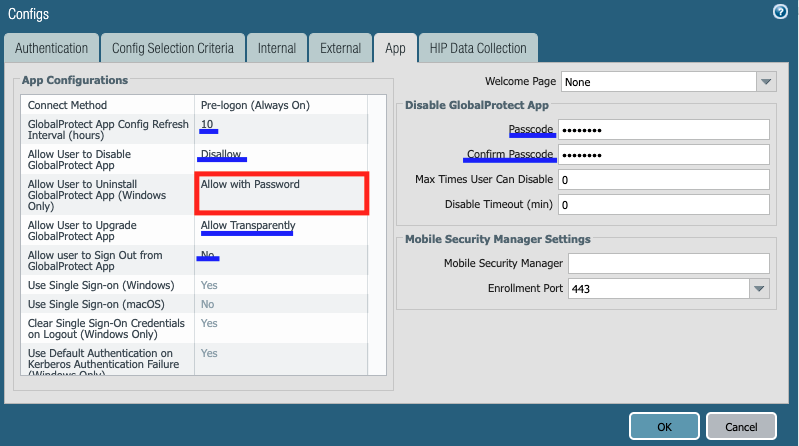
- " Allow User to Uninstall GlobalProtect App (Windows Only) " is set to " Allow with Password ."
- Depending on the version being downgraded to, there are other potential validation errors that could occur because of other app configurations (like those highlighted in blue and others not captured here.)
Resolution
- Delete the app settings from CLI:
FW1 >configure
FW1 #delete vsys vsys2 global-protect global-protect-portal <portal> client-config configs <name> agent-ui
FW1 >exit
Note : If multiple VSYS is not configured, ignore the parameter.
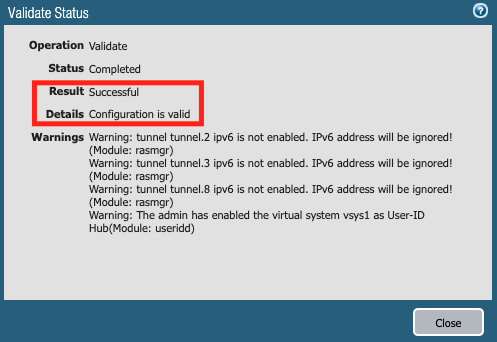
- Now Commit or Validation of commit process using GUI: Commit > Validate Commit will succeed.
Additional Information
After a commit is completed, some of the agent app settings will restore to default:
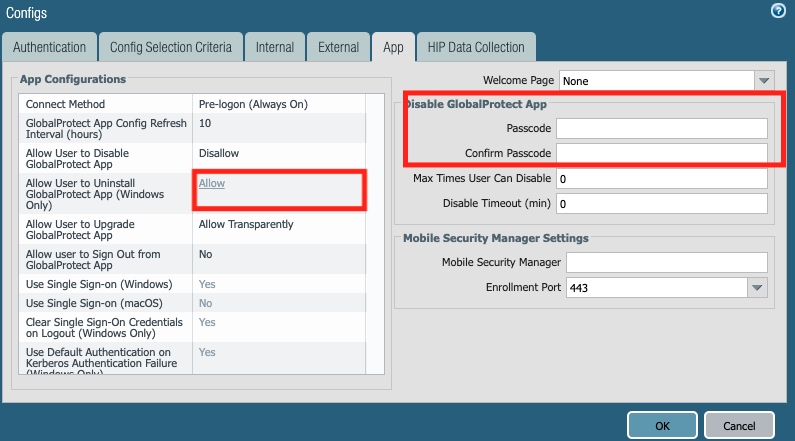
These and any other settings that may have been removed will require reconfiguration. Hence it is recommended to take note of all app configurations beforehand.